Skip to content
website logo
  • office-365 social media icon
  • vsware social media icon
  • tiktok-1 social media icon
  • insta social media icon
  • facebook social media icon
  • Log In
    Coláiste Choilm Tullamore
    • Home
    • Admissions
      • Admissions 2027-2028
      • Open Night 2026
      • Parent Handbook
    • About Us
      • Senior Leadership Team Address
      • Mission Statement & Ethos
      • Staff 2026-2027
      • Past
      • Facilities
      • School Crest Explained
      • Policies
    • Parents
      • Parent Handbook
      • VSware
      • Parents Association
      • Schoolbooks
      • Uniform
      • School Club Shop
    • Students
      • Study Skills & Wellbeing Guidance
      • Student Awards
      • Student Council
      • Cairde
      • Pastoral Care
      • Anti-Bullying
    • Curriculum
      • Junior Cycle
      • Transition Year
      • LCA
      • Leaving Certificate
      • LCVP
      • Career Guidance
      • Subject Options
      • School Inspections
    • Extra Curricular
      • Sports
      • Music
      • Clubs
      • Green Schools
      • India Immersion Project
      • School Tours
    • Calendar
    • Alumni
    Skip to content
    website logo
    • Home
    • Admissions
      • Admissions 2027-2028
      • Open Night 2026
      • Parent Handbook
    • About Us
      • Senior Leadership Team Address
      • Mission Statement & Ethos
      • Staff 2026-2027
      • Past
      • Facilities
      • School Crest Explained
      • Policies
    • Parents
      • Parent Handbook
      • VSware
      • Parents Association
      • Schoolbooks
      • Uniform
      • School Club Shop
    • Students
      • Study Skills & Wellbeing Guidance
      • Student Awards
      • Student Council
      • Cairde
      • Pastoral Care
      • Anti-Bullying
    • Curriculum
      • Junior Cycle
      • Transition Year
      • LCA
      • Leaving Certificate
      • LCVP
      • Career Guidance
      • Subject Options
      • School Inspections
    • Extra Curricular
      • Sports
      • Music
      • Clubs
      • Green Schools
      • India Immersion Project
      • School Tours
    • Calendar
    • Alumni
    Your browser appears to have JavaScript disabled. We use JavaScript to provide essential functionality on this website. Please enable JavaScript in your browser settings.
    Share

    VSware

    Home  /  Digital Technology Essentials  /  VSware

    VSware Student Alerts

    VSware provides a number of visual indicators to help staff quickly identify important information relating to students. These alerts appear beside a student's name throughout the system and should be checked regularly when taking attendance, reviewing student information, or preparing for classes.

    The indicators may highlight:

    • AEN (Additional Educational Needs) information
    • Medical Alerts that may require staff awareness or action
    • Student Alerts relating to welfare, wellbeing, pastoral care, or other important information
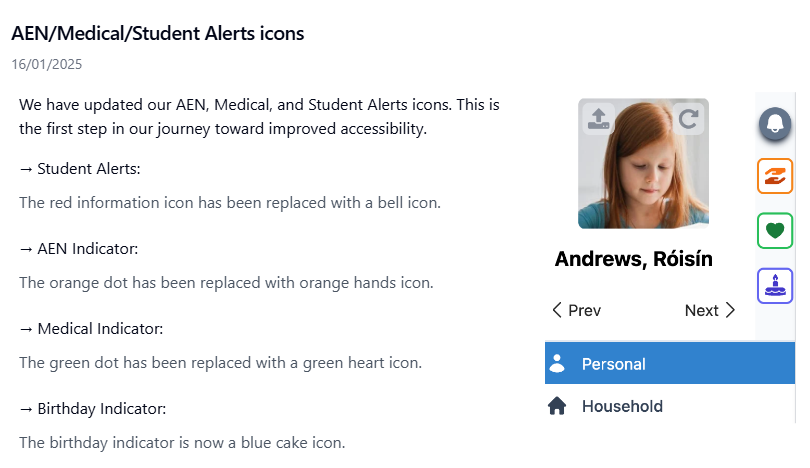
    When an alert icon is visible, click on the student record to view the relevant details and ensure appropriate supports or accommodations are implemented.

    Care Monitor Alerts

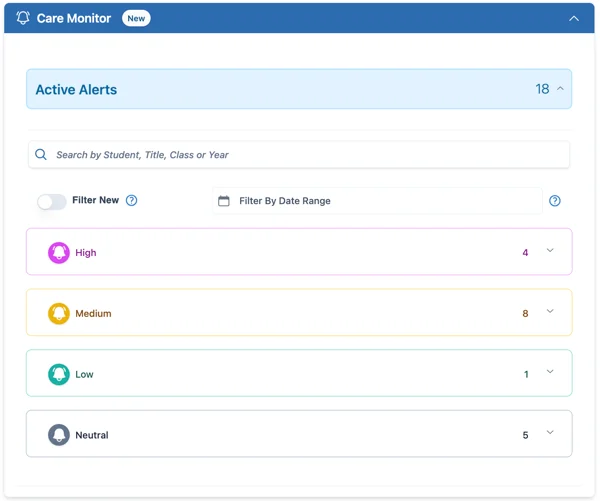
    The Care Monitor widget on the VSware dashboard provides staff with a quick overview of active student care alerts. The information displayed depends on the students you teach and the permissions assigned to your account.

    Care Monitor alerts are colour-coded according to their priority level:

    • 🟣 High Priority - Important information requiring immediate staff awareness.
    • 🟡 Medium Priority - Information that may require monitoring or follow-up.
    • 🟢 Low Priority - Information that staff should be aware of.
    • ⚫ Neutral - General information or updates.

    Important: All staff members can view High Priority alerts, regardless of whether they teach the student or have specific permissions for that student's record.

    To help manage alerts, you can:

    • Filter alerts by date range.
    • Use the Filter New toggle to display only alerts created today.
    • Select an alert to view further details and any recommended actions.

    The Care Monitor system helps ensure that important wellbeing, pastoral, behavioural, medical, and support-related information is communicated effectively across the school, enabling staff to provide appropriate support while remaining informed of any significant concerns.

    The screenshot below identifies the Care Monitor alert icons, priority levels, and filtering options available within the VSware dashboard.
    ⚠️ Staff are expected to treat all student information as confidential and use it solely for educational and student welfare purposes.


    We use cookies to tailor your web browsing experience. By accepting the below and continuing to browse our site, you agree to our privacy policy.

    TOP >
    Colaiste Choilm Tullamore
    O'Moore St., Tullamore,. Co Offaly,. R35 WF97.
    057 93 51756
    admin@colaistechoilmtullamore.ie
    > Sponsors
    office-365 social media icon
    vsware social media icon
    tiktok-1 social media icon
    insta social media icon
    facebook social media icon
    website logo
    Copyright © 2026 Colaiste Choilm Tullamore. All Rights Reserved.
    Powered by website logo